Mark the stitches you have finished and undo an accidental mark.
Steps
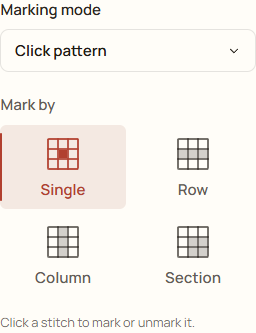
Open your stitching project. In Marking mode, choose Click pattern.
Under Mark by, choose Single. Click or tap a stitched square on the chart to mark it complete.
If you marked the wrong square, click or tap that square again to remove its mark. You can also choose Undo for the most recent action.
Check the Save indicator before leaving so your place is available when you return.
Example: Click pattern and Single let you mark one stitch at a time.
One stitch or a larger area?
Single affects one stitch. Row, Column and Section can affect many stitches at once, so check the selected tool before clicking.
Clear in the coordinate controls affects the selected target. The separate clear-all-progress action affects the whole project; read its confirmation carefully.