Record the floss you have so you can check it while planning a project.
Steps
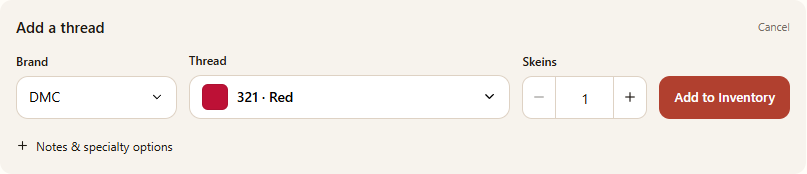
Choose Stash, then find My Inventory. Select Add Thread.
Under Thread, open the thread picker and search by DMC number or color name. Select the matching thread.
Set Skeins to the number you own using the number field or the minus and plus buttons. Choose the add button, which shows the quantity and selected thread.
To change a thread later, select the pencil at the end of its row, then choose Edit. Change the quantity and choose Save changes.
Example: choose the thread and quantity, then use the add button.Example inventory row: the action icon at the right opens options for this thread.
Find or update a thread
Use Search inventory to find an entry; the brand filter and Sort can narrow or reorder the list. Clear filters if a thread seems to be missing.
When editing, set the quantity to 0 to keep the entry as out of stock. Choose Remove to remove the entry instead.
If you add a thread already in your inventory, the amount entered is added to the existing quantity. New entries require at least one whole skein.
Notes and product lines
Open Notes & specialty options to add a note or choose an available product line. DMC is offered in the current Add Thread picker; more brands are marked as coming soon.
The inventory is optional. The quantity you own is not the same as a pattern's estimated requirement.